Joule Module Development
Modules are executable programs that process data streams. They are connected to each other by pipes. Joule runs each module as a separate process. This enforces isolation and improves resiliency. Malfunctioning modules do not affect other parts of the pipeline and can be restarted without interrupting the data flow. There are three basic types: reader, filter, and composite.
Examples in the documentation below are available at https://github.com/wattsworth/example-modules.git This repository provides serveral examples of each module types and can be used as a template to design your own installable Joule modules.
git clone https://github.com/wattsworth/example-modules.git
cd example-modules
# for local development create a virtual environment
python3 -m venv venv
source venv/bin/activate
pip install .
# for deployment use pipx or uv to install package globally
The layout of the repository is shown below.
example_modules/
├── jouleexamples
│   ├── example_composite.py
│   ├── example_filter.py
│   ├── example_reader.py
│   └── ... other modules
├── module_configs
│   ├── example_composite.conf
│   ├── example_filter.conf
│   ├── example_reader.conf
│   └── ... other module configs
├── README.rst
└── stream_configs
    └── ... stream config examples
Reader Modules
Reader modules are designed to read data into the Joule Framework. Data can come from
sensors, system logs, HTTP API's or any other timeseries data source. Reader modules
should extend the base class :class:joule.client.ReaderModule illustrated below.
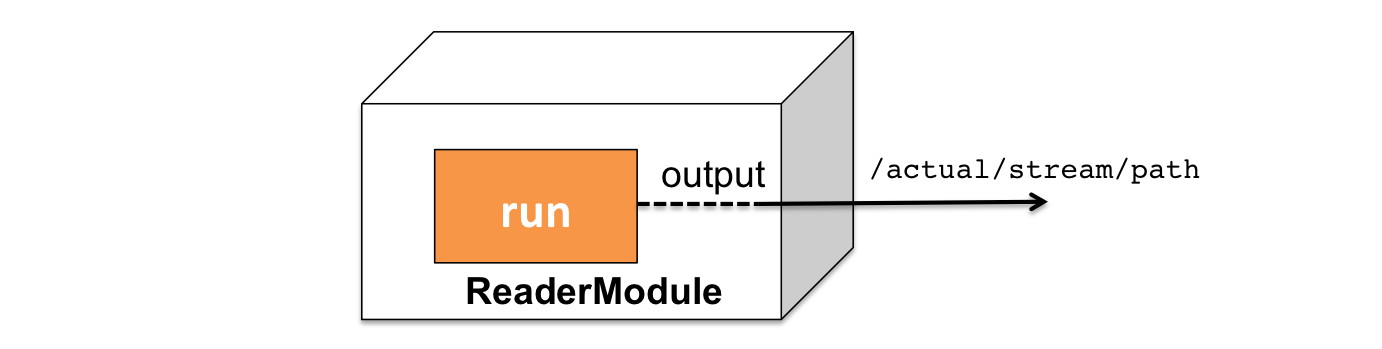
Examples
Basic Reader
#!/usr/bin/env python3

from joule.client import ReaderModule
from joule.utilities import time_now
import asyncio
import numpy as np


class ExampleReader(ReaderModule):
    "Example reader: generates random values"

    async def run(self, parsed_args, output):
        while True:
            value = np.random.rand()  # data from sensor
            await output.write(np.array([[time_now(), value]]))
            await asyncio.sleep(1)


def main():
    r = ExampleReader()
    r.start()


if __name__ == "__main__":
    main()
Reader modules should extend the base :class:joule.client.ReaderModule class. The
child class must implement the :meth:joule.client.ReaderModule.run coroutine which should perform
the following in a loop:
- Read data from the input
- Timestamp data with Unix microseconds
- Insert data into the output stream
- Sleep to create the data rate
Line 11 reads data from the input (a random number function). Line 12 timestamps the data and inserts it into the output stream. Line 13 sleeps for one second creating a 1Hz sample rate. Note that the asyncio.sleep coroutine is used instead of the time.sleep function.
Note
The loop structure shown above should only be used for low bandwidth data sources. For higher bandwidth data pipe caching should be enabled or the data should be written in chunks as shown below. Write frequency should be 1Hz or lower to reduce inter-process communication and network overhead.
High Bandwidth Reader
#!/usr/bin/env python3

from joule.client import ReaderModule
from joule.utilities import time_now
import asyncio
import numpy as np


class HighBandwidthReader(ReaderModule):
    """ Produce a 1Hz ramp sampled at [rate] Hz """

    def custom_args(self, parser):
        grp = parser.add_argument_group("module",
                                        "module specific arguments")
        grp.add_argument("--rate", type=float,
                         required=True,
                         help="sample rate in Hz")

    async def run(self, parsed_args, output):
        start_ts = time_now()
        # run 5 times per second
        period = 1
        samples_per_period = np.round(parsed_args.rate * period)
        while True:
            end_ts = start_ts + period * 1e6
            ts = np.linspace(start_ts, end_ts,
                             samples_per_period, endpoint=False)
            vals = np.linspace(0, 33, samples_per_period)
            start_ts = end_ts
            chunk = np.hstack((ts[:, None], vals[:, None]))
            await output.write(chunk)
            await asyncio.sleep(period)


def main():
    r = HighBandwidthReader()
    r.start()

if __name__ == "__main__":
    main()
Describe the argument parsing setup
Intermittent Reader
Another example showing how to handle sensor errors by creating intervals
#!/usr/bin/env python3

from joule.client import ReaderModule
from joule.utilities import time_now
import asyncio
import numpy as np
import logging

ERROR_PROBABILITY = 0.25


class IntermittentReader(ReaderModule):
    """ Like HighBandwidth reader with random data interruptions """

    def custom_args(self, parser):
        grp = parser.add_argument_group("module",
                                        "module specific arguments")
        grp.add_argument("--rate", type=float,
                         required=True,
                         help="sample rate in Hz")

    async def run(self, parsed_args, output):
        start_ts = time_now()
        period = 1
        samples_per_period = np.round(parsed_args.rate * period)
        while True:
            try:
                end_ts = start_ts + period * 1e6
                ts = np.linspace(start_ts, end_ts,
                                 samples_per_period, endpoint=False)
                vals = np.linspace(0, 33, samples_per_period)
                start_ts = end_ts
                chunk = np.hstack((ts[:, None], vals[:, None]))
                # simulate an error
                if np.random.rand() < ERROR_PROBABILITY:
                    raise ValueError
                await output.write(chunk)
            except ValueError:
                logging.error("simulated data interruption")
                await output.close_interval()
            await asyncio.sleep(period)


def main():
    r = IntermittentReader()
    r.start()


if __name__ == "__main__":
    main()
Development
During development it is often helpful to run the reader module as a standalone process in order to use debuggers such as pdb or visualization tools like matplotlib.pyplot. When a reader module is executed from the command line the output pipe is connected to stdout:
$>./demo_reader.py
1485188853650944 0.32359053067687582 0.70028608966895545
1485188853750944 0.72139550945715136 0.39218791387411422
1485188853850944 0.40728044378612194 0.26446072057019654
1485188853950944 0.61021957330250398 0.27359526775709841
# hit ctrl-c to stop
If the --module_config argument is specified the output pipe is instead connected to the stream specified in the configuration file. The stream will be created if it does not exist. By default the module will connect to the local
joule server, use the --url option to connect to a specific joule server. Any arguments in the configuration file will be parsed as if they were specified on the command line.
$>./demo_reader.py --module_config=module.conf
  Contacting joule server at http://localhost:8080
# hit ctrl-c to stop
Testing
This section refers to test_reader.py in the example_modules repository. Joule unittests are written using asynctest
<https://asynctest.readthedocs.io/en/latest/>_, a library built on top of the standard unittest module that reduces the boilerplate of writing tests for async coroutines.
Each unittest file should contain a single async.TestCase class. The
test runner will automatically run any functions starting with
test_. Each test should have a docstring explaining the input and desired output.
Tests should have three main sections as shown in the test_reader function below:
class TestReader(asynctest.TestCase):

    def test_reader(self):
        " with a rate=0.1, reader should generate 10 values in 1 second "
    # 1. build test objects
    # 2. run reader in an event loop
    # 3. check the results
Build test objects
# build test objects
my_reader = ReaderDemo()
pipe = LocalPipe("output", layout="float32_1")
args = argparse.Namespace(rate=0.1, pipes="unset")
-
Create an instance of the reader module. Properly designed readers should not require any initialization parameters.
-
Create an output pipe to receive data from the module.
LocalPipetakes two arguments, a pipe name which should be a helpful string, and a layout. The layout should match the stream configuration file associated with your module. See the NumpyPipe documentation for details on local pipes and the layout parameter. -
Create an args object that contains values for any custom arguments your module requires, it also should also initialize the pipes argument to "unset". In production, modules generate pipes automatically from their command line parameters. In testing we disable the pipe building routine by using the keyword "unset", and instead pass our own pipe to the module's run function, below.
Run event loop
loop = asyncio.get_event_loop()
my_task = asyncio.ensure_future(my_reader.run(args, pipe))
loop.call_later(1, my_task.cancel)
try:
    loop.run_until_complete(my_task)
except asyncio.CancelledError:
    pass
loop.close()
Modules are asynchronous coroutines that run in an event loop. The
asynctest framework provides a new event loop for each test so we can
safely use the global loop returned by asyncio.get_event_loop.
This code is common boilerplate for all reader modules and in
general it should not require any customization. The code does the following:
- Get a reference to the global event loop
- Set up the reader to run as a
Taskusing the arguments and pipe created earlier - Schedule the reader task to be cancelled after one second
- Run the event loop
loopuntil the reader task stops - When the reader task is cancelled it generates a
CancelledErrorwhich can be safely ignored - Close the event loop so the test exits cleanly
Check results
result = pipe.read_nowait()
# data should be 0,1,2,...,9
np.testing.assert_array_equal(result['data'],
                                        np.arange(10))
# timestamps should be about 0.1s apart
np.testing.assert_array_almost_equal(np.diff(result['timestamp'])/1e6,
                                                np.ones(9)*0.1, decimal=2)
This is the most important part of the test and it will vary greatly from module to module. There are two steps:
-
Retrieve data from the pipe using
pipe.read_nowait(). This is the synchronous version of thereadcommand and should only be used in testing. Modules should always use theawait pipe.read()syntax. By defaultread_nowaitreturns a structured array with a data field and timestamp field. If you want timestamps in column 0 and elements in columns 1-N, useread_nowait(flatten=True) -
Use the
numpy.testinglibrary to compare the data to an expected dataset you create manually. Note that theassert_array_almost_equalis the preferred testing function. Floating point arithmetic is inexact so directly comparing data using==can generate spurious errors.
.. _ArgumentParser: https://docs.python.org/3/library/argparse.html#argparse.ArgumentParser .. _Namespace: https://docs.python.org/3/library/argparse.html#argparse.Namespace
Documentation
joule.client.ReaderModule
Inherit from this class and implement a :meth:run coroutine to create a Joule reader module.
Other methods documented below may be implemented as desired.
custom_args(parser)
Override to add custom command line arguments to the module.
class ModuleDemo(BaseModule):

    def custom_args(self, parser):
            parser.description = "**module description**"
            # add optional help text to the argument
            parser.add_argument("--arg", help="custom argument")
            # parse json input
            parser.add_argument("--json_arg", type=json.loads)
            # a yes|no argument that resolves to True|False
            parser.add_argument("--flag_arg", type=joule.yesno)

    #... other module code
Always use keyword arguments with modules so they can be specified in the [Arguments] section of module configuration file
Use the type parameter to specify a parser function. The parser
function should accept a string input and return the appropriate object.
routes()
Override to register HTTP handlers for the module. Return an array of handlers. This creates a visualization interface.
run(parsed_args, output)
async
This method must be implemented. It should run in a loop, if it returns the module stops.
Parameters:
| Name | Type | Description | Default |
|---|---|---|---|
parsed_args
|
Namespace
|
command line arguments, configure with :meth: |
required |
output
|
Pipe
|
pipe connection to the output data stream |
required |
.. code-block:: python
class ModuleDemo(ReaderModule):

    def run(self, parsed_args, output):
         while(not self.stop_requested):
            data = self.read_sensor()
            await output.write(data)

    def self.read_sensor(self) -> np.ndarray:
        # custom logic specific to the reader

    #... other module code
setup(parsed_args, app, output)
async
Configure the module, executes before :meth:run
Parameters:
| Name | Type | Description | Default |
|---|---|---|---|
parsed_args
|
Namespace
|
parsed command line arguments |
required |
app
|
Application
|
aiohttp Application object |
required |
output
|
Pipe
|
pipe connection to output stream |
required |
start(parsed_args=None)
Execute the module. Do not override this function. Creates an event loop and
executes the :meth:run coroutine.
Parameters:
| Name | Type | Description | Default |
|---|---|---|---|
parsed_args
|
Namespace
|
omit to parse the command line arguments |
None
|
stop()
Override to change the default shutdown strategy which simply sets
the stop_requested flag. If a module does not terminate within a few seconds
of this method being called Joule will forcibly stop the module with SIGKILL.
Filter Modules
Filter modules process data. They may have one or more input streams and one or
more output streams. Filter modules should extend the base class :class:joule.client.FilterModule illustrated below.

Examples
Basic Filter
#!/usr/bin/env python3

from joule.client import FilterModule
from scipy.signal import medfilt
import asyncio


class ExampleFilter(FilterModule):
    """Apply linear scaling to input"""

    async def run(self, parsed_args, inputs, outputs):
        # data pipes (specified in configuration file)
        raw = inputs["raw"]
        scaled = outputs["scaled"]

        # linear scaling: y=mx+b
        m = 2.0
        b = 1.5

        while True:
            # read new data
            vals = await raw.read()
            # apply linear scaling y=mx+b
            vals["data"] = vals["data"] * m + b
            # write output
            await scaled.write(vals)
            # remove read data from the buffer
            raw.consume(len(vals))
            # propagate interval boundaries
            if raw.end_of_interval:
                await scaled.close_interval()
            # limit execution to 1Hz chunks
            await asyncio.sleep(1)


def main():
    r = ExampleFilter()
    r.start()


if __name__ == "__main__":
    main()
Filter modules should extend the base :class:FilterModule class. The
child class must implement the :meth:joule.FilterModule.run coroutine which should perform
the following in a loop:
- Read from input pipe(s)
- Perform data processing
- Write to output pipe(s)
- Consume input data
Lines 10-11 retrieve the module's :class:joule.Pipe connections to the
input and output streams. Line 19 reads in new data from the "raw" stream into a
Numpy structured array_. Line 21 applies the linear scaling to the data in place.
The data is then written to the output pipe in line 23 and the input data is removed
from the buffer on line 25. The sleep statement ensures that data is processed in large
chunks regardless of the rate at which it arrives. This ensures the system operates efficiently
by reducing the frequency of context switches and inter-process communication.
Offset Filter
#!/usr/bin/env python3

from joule.client import FilterModule
from joule.models.pipes import EmptyPipe

class OffsetFilter(FilterModule):
    "Add offset to data "

    def custom_args(self, parser):
        grp = parser.add_argument_group("module","module specific arguments")
        grp.add_argument("--offset",
                         type=int,
                         required=True,
                         help="apply an offset")

    async def run(self, parsed_args, inputs, outputs):
        stream_in = inputs["input"]
        stream_out = outputs["output"]
        while(True):
            try:
                sarray = await stream_in.read()
                sarray["data"] += parsed_args.offset
                await stream_out.write(sarray)
                stream_in.consume(len(sarray))
            except EmptyPipe:
                break


def main():
    r = OffsetFilter()
    r.start()

if __name__ == "__main__":
    main()
The loop executes a WINDOW size median filter. Line 16 reads in new data from the “raw” stream into a structured array. Lines 19-20 execute the median filter in place. Many filtering algorithms including median require data before and after a sample to compute the output. Modules process data in chunks which produces artifacts at the beginning and end where there is insufficient data to compute the output. In this instance, the first and last EDGE samples of the chunk are invalid so they are omitted from the output in Line 23. The call to consume() on Line 26 prepends the last 2 × EDGE samples to the next input chunk to compensate for these boundary artifacts. This execution sequence produces exactly the same result as a median filter run over the entire dataset at once.
Development
During development it is often helpful to run modules as standalone processes in order to use debuggers such as pdb or visualization tools like matplotlib.pyplot. Filter (and Composite) modules may be executed outside of the Joule environment in either live or historic mode. When executed independently the module configuration file must be provided so that the module can request the appropriate stream connections from Joule.
Note
The joule service must be running in order to run filters as standalone processes
Live Isolation Connect filter inputs to live streams produced by the current joule pipeline. Specify the module configuration file and a directory with configurations for each output stream.
# [module.conf] is a module configuration file
$>./demo_filter.py --module_config=module.conf
Requesting live stream connections from jouled... [OK]
#...stdout/stderr output from filter
# hit ctrl-c to stop
Historic Isolation Connect filter inputs to a range of stream data saved in NilmDB.
Specify historic execution by including a time range with --start and --end arguments. The time range may be a date string or a Unix microseconds timestamp. Common phrases are also supported such as "2 hours ago" or "today".
Warning
Running a filter in historic isolation mode will overwrite existing output stream data
# [module.conf] is a module configuration file

$>./demo_filter.py --module_config=module.conf \
        --start="yesterday" --end="1 hour ago"
    Requesting historic stream connections from jouled... [OK]
#...stdout/stderr output from filter</i>

# program exits after time range is processed
Testing
TODO
Documentation
joule.client.FilterModule
custom_args(parser)
Override to add custom command line arguments to the module.
class ModuleDemo(BaseModule):

    def custom_args(self, parser):
            parser.description = "**module description**"
            # add optional help text to the argument
            parser.add_argument("--arg", help="custom argument")
            # parse json input
            parser.add_argument("--json_arg", type=json.loads)
            # a yes|no argument that resolves to True|False
            parser.add_argument("--flag_arg", type=joule.yesno)

    #... other module code
Always use keyword arguments with modules so they can be specified in the [Arguments] section of module configuration file
Use the type parameter to specify a parser function. The parser
function should accept a string input and return the appropriate object.
routes()
Override to register HTTP handlers for the module. Return an array of handlers. This creates a visualization interface.
run(parsed_args, inputs, outputs)
async
This method must be implemented. It should run in a loop, if it returns the module stops.
Parameters:
| Name | Type | Description | Default |
|---|---|---|---|
parsed_args
|
Namespace
|
parsed command line arguments, configure with :meth: |
required |
inputs
|
Dict[str, Pipe]
|
pipe connections to input streams indexed by name (specified in the module configuration file). |
required |
outputs
|
Dict[str, Pipe]
|
pipe connections to output streams indexed by name (specified in the module configuration file). |
required |
class ModuleDemo(FilterModule):

    def run(self, parsed_args, inputs, outputs):
        raw = inputs["raw"]
        filtered = outputs["filtered"]
        # this filter just passes the input through to the output
            while(not self.stop_requested):
            data = await raw.read()
            await filtered.write(data)
            raw.consume(len(data))

    #... other module code
setup(parsed_args, app, inputs, outputs)
async
Initial configuration of the module. implementing this method is optional
Parameters:
| Name | Type | Description | Default |
|---|---|---|---|
parsed_args
|
Namespace
|
parsed command line arguments |
required |
app
|
Application
|
aiohttp Application object |
required |
inputs
|
Dict[str, Pipe]
|
pipe connections to input streams. Keys are the names specified in the module configuration file |
required |
outputs
|
Dict[str, Pipe]
|
pipe connections to output streams. Keys are the names specified in the module configuration |
required |
start(parsed_args=None)
Execute the module. Do not override this function. Creates an event loop and
executes the :meth:run coroutine.
Parameters:
| Name | Type | Description | Default |
|---|---|---|---|
parsed_args
|
Namespace
|
omit to parse the command line arguments |
None
|
stop()
Override to change the default shutdown strategy which simply sets
the stop_requested flag. If a module does not terminate within a few seconds
of this method being called Joule will forcibly stop the module with SIGKILL.
Composite Modules
Composite modules aggregate multiple modules into a single
process. They may have one or more input streams and one or
more output streams. Composite modules should extend the base
class :class:joule.client.CompositeModule illustrated below.

Examples
#!/usr/bin/python3

import argparse
from joule.models.pipes import LocalPipe
from joule.client import CompositeModule

from high_bandwidth_reader import HighBandwidthReader
from example_filter import ExampleFilter


class ExampleComposite(CompositeModule):
    """ Merge reader and filter into a single module:
                [reader -> filter]->
    """

    async def setup(self, parsed_args,
                    inputs, outputs):
        # 1.) create nested modules
        my_reader = HighBandwidthReader()
        my_filter = ExampleFilter()

        # 2.) create local pipes for interior streams
        pipe = LocalPipe(name="raw", layout="float32_1")

        # 3.) convert modules into tasks
        #  output is an interior stream (write-end)
        parsed_args = argparse.Namespace(rate=100)
        task1 = my_reader.run(parsed_args, pipe)
        #  raw is an interior stream (read-end)
        #  filtered is an exterior stream
        parsed_args = argparse.Namespace()
        task2 = my_filter.run(parsed_args,
                              {"raw": pipe},
                              {"filtered": outputs["filtered"]})

        # 4.) tasks are executed in the main event loop
        return [task1, task2]


def main():
    r = ExampleComposite()
    r.start()


if __name__ == "__main__":
    main()
The child class must implement the :meth:joule.CompositeModule.setup coroutine
which should perform the following:
- Create modules
- Create local pipes for interior streams
- Start modules by calling :meth:
joule.BaseModule.runwith the appropriate parameters - Return module tasks for execution in the main event loop
This example contains a high-bandwidth-reader connected to a median-filter.
The modules are connected with a :class:joule.LocalPipe and the output of the
filter is connected to a :class:joule.OutputPipe named filtered.
Creating Module Arguments
In the example above, both modules receive the parsed_args parameter directly.
In more complex scenarios it is often necessary to construct a :class:argparse.Namespace object
for each module with the particular arguments it requires. Make sure all arguments are specified
and match the expected data types The code snipped below constructs an appropriate Namespace
object for the ArgumentParser configuration.
import json
import argparse

# example ArgumentParser

args = argparse.ArgumentParser("demo")
args.add_argument("--arg1", required=True)  # modules should use keyword arguments
args.add_argument("--arg2", type=int, required=True)
args.add_argument("--arg3", type=json.loads, required=True)

# to produce these arguments manually:

module_args = argparse.Namespace(**{
"arg1": "a string",  # type not specified
"arg2": 100,         # type=int
"arg3": [100,10,4]   # type=json
})
Development
See Filter Development
Testing
See Filter Testing
Documentation
joule.client.CompositeModule
custom_args(parser)
Override to add custom command line arguments to the module.
class ModuleDemo(BaseModule):

    def custom_args(self, parser):
            parser.description = "**module description**"
            # add optional help text to the argument
            parser.add_argument("--arg", help="custom argument")
            # parse json input
            parser.add_argument("--json_arg", type=json.loads)
            # a yes|no argument that resolves to True|False
            parser.add_argument("--flag_arg", type=joule.yesno)

    #... other module code
Always use keyword arguments with modules so they can be specified in the [Arguments] section of module configuration file
Use the type parameter to specify a parser function. The parser
function should accept a string input and return the appropriate object.
routes()
Override to register HTTP handlers for the module. Return an array of handlers. This creates a visualization interface.
setup(parsed_args, inputs, outputs)
async
Initial configuration of the module. this method must be implemented
Parameters:
| Name | Type | Description | Default |
|---|---|---|---|
parsed_args
|
Namespace
|
parsed command line arguments |
required |
inputs
|
Dict[str, Pipe]
|
pipe connections to input streams. Keys are the names specified in the module configuration file |
required |
outputs
|
Dict[str, Pipe]
|
pipe connections to output streams. Keys are the names specified in the module configuration |
required |
Returns:
| Type | Description |
|---|---|
List[Coroutine]
|
array of coroutine objects |
start(parsed_args=None)
Execute the module. Do not override this function. Creates an event loop and
executes the :meth:run coroutine.
Parameters:
| Name | Type | Description | Default |
|---|---|---|---|
parsed_args
|
Namespace
|
omit to parse the command line arguments |
None
|
stop()
Override to change the default shutdown strategy which simply sets
the stop_requested flag. If a module does not terminate within a few seconds
of this method being called Joule will forcibly stop the module with SIGKILL.
User Interfaces
Modules can provide web-based user interfaces. When a Joule node is connected to a Lumen server, the user authentication and authorization is handled by Lumen and the interface is presented on a common dashboard with other modules the user is authorized to use.
To add an interface to a module implement the :meth:joule.client.BaseModule.routes function
and register handlers for any routes your module implements. Then enable the interface
by changing the is_app attribute to yes in the
:ref:sec-modules file.
Examples
Basic Interface
#!/usr/bin/env python3

import asyncio
from aiohttp import web
from joule.client import ReaderModule


class ExampleInterface(ReaderModule):

    async def run(self, parsed_args, output):
        # data processing...
        while True:
            await asyncio.sleep(1)

    def routes(self):
        return [web.get('/', self.index)]

    async def index(self, request):
        return web.Response(text="hello world!")


def main():
    r = ExampleInterface()
    r.start()


if __name__ == "__main__":
    main()
Bootstrap Interface
Typical web interfaces require more complex HTML, cascading style sheets (CSS), and javascript. The example below
provides a complete module implementation using the Bootstrap <http://getbootstrap.com/> CSS framework
and Jinja <http://jinja.pocoo.org/> HTML templates.
#!/usr/bin/env python3

import asyncio
from aiohttp import web
import aiohttp_jinja2
import jinja2
import os
from random import randint

from joule.client.reader_module import ReaderModule

CSS_DIR = os.path.join(os.path.dirname(__file__), 'assets', 'css')
JS_DIR = os.path.join(os.path.dirname(__file__), 'assets', 'js')
TEMPLATES_DIR = os.path.join(os.path.dirname(__file__), 'assets', 'templates')


class BootstrapInterface(ReaderModule):

    async def setup(self, parsed_args, app, output):
        loader = jinja2.FileSystemLoader(TEMPLATES_DIR)
        aiohttp_jinja2.setup(app, loader=loader)

    async def run(self, parsed_args, output):
        # data processing...
        while True:
            await asyncio.sleep(1)

    def routes(self):
        return [
            web.get('/', self.index),
            web.get('/data.json', self.data),
            web.static('/assets/css', CSS_DIR),
            web.static('/assets/js', JS_DIR)
        ]

    @aiohttp_jinja2.template('index.jinja2')
    async def index(self, request):
        return {'message': "hello world"}

    # json end point for AJAX requests
    async def data(self, request):
        # return summary statistics, etc.
        return web.json_response(data={'random_value': randint(0, 10)})


def main():
    r = BootstrapInterface()
    r.start()


if __name__ == "__main__":
    main()
In addition to the module code itself this interface requires several additional files located in the assets directory as shown:
├── bootstrap_interface.py
└── assets
    ├── css
    │   └── main.css # and other css files
    ├── js
    │   └── index.js # other js files
    └── templates
        ├── layout.jinja2
        └── index.jinja2
The HTML templates are stored in assets/templates. layout.jinja2 is common to all views and provides hooks
to customize the content and inject additional stylesheet and script tags. The module home page renders index.jinja
which is shown below:
{% extends "layout.jinja2" %}
{% block title %} Bootstrap Interface {% endblock %}
{% block css %}
<link rel="stylesheet" href="assets/css/index.css">
{% endblock %}
{% block js %}
<script src="assets/js/index.js"></script>
{% endblock %}
{% block content %}
<div class="jumbotron jumbotron-fluid">
<div class="container">
<h1 class="display-4">Bootstrap Interface</h1>
<p class="lead">
This module uses CSS and Javascript to create an interactive UI
</p>
<hr class="my-4">
<ul class="list-group">
<!-- example of jinja2 data -->
<li class="list-group-item">Static value injected with jinja2:
<span class="message">{{ message }}</span>
</li>
<!-- example of AJAX data -->
<li class="list-group-item">Dynamic data loaded with AJAX:
<!-- see assets/index.js for AJAX code -->
<span id="data" class="message">—</span>
</li>
</ul>
<p class="lead mt-4">
<button class="btn btn-primary btn-lg" onclick="change_bkgd()">
Change Background
</button>
</p>
</div>
</div>
{% endblock %}
Notice that additional CSS and javascript assets that are injected into the appropriate blocks in the layout template. Bootstrap classes provide a simple and powerful mechanism for creating a basic page, but in some cases it may be necessary to add custom CSS to fine tune an element's appearance.
.message{
    background: #c2daf3;
    margin: 4px;
    padding: 8px;
    border-radius: 0.4rem;
    border-color: #007bff;
    border-style: solid;
    border-width: 2px;
    margin-left: 10px;
    font-weight: bold;
}
Javascript makes websites interactive. This file makes repeated calls to the server for new data. Using AJAX requests rather than reloading the entire page improves the user's experience and reduces network traffic.
$(function () {
    setInterval(loadData, 2000);
    $("#update-interval").val(loadData);
});

function loadData(){
    $.get("data.json", function (data) {
        $("#data").text(data['random_value']);
    });
}

function change_bkgd(){
    let color = parseInt(Math.random()*0xFFFFFF).toString(16);
    $(".jumbotron").css("background", "#"+color);
}
Development
When running as a standalone process, modules that provide a web interface
will start a local webserver on port 8000 (by default). This is accessible
from a browser at http://localhost:8000.